


I suppose you could say I have a love-hate relationship with Salesforce.
There is a lot I genuinely value about it. It’s incredibly customizable. It has important functionality built in, including things like Roles, Permissions, and the ability to log in as another user. It’s also deeply integrated with tools like HubSpot and DocuSign. And because our engineering team has built date-partitioned tables off the underlying data, I have historical snapshots I can go back to whenever I inevitably need to investigate what changed.
On the other hand, a coworker recently described one of Salesforce’s biggest problems as “click fatigue.” Ever since he said it, I haven’t been able to unthink it. Once you notice the clicking, you notice it everywhere. Sales feels it on the front end, where creating a single Opportunity can take no fewer than 20 clicks. I feel it on the back end, where I spend a lot of time in Setup acting as our de facto Salesforce admin.
And then there are the quirks. I’ve spent an unreasonable amount of time figuring out ways around them, so partly for context and partly because it is cathartic for me to write them down, here are a few:
Validation rules don’t work particularly well across objects. If you want to restrict a field on the Opportunity Product only when the Opportunity moves to Closed Won, a validation rule can’t do it.
Once you have an Opportunity Product and want to change the Product, you can’t. You can’t clone it either. Your only option is to rebuild the Opportunity Product from scratch.
The Start and End Dates on the Opportunity Product don’t talk to the Opportunity Schedule.
Salesforce seems to anchor everything on Close Date; it is even a hard-coded required field. At the places I’ve worked, Close Date often hasn’t been especially meaningful. I’ve always looked at revenue based on when it is scheduled in the Opportunity Product.
Related Contacts are a mess. It’s very easy to end up with duplicate Contacts, including situations where one is a Related Contact and can’t easily be merged.
Reports and dashboards have all sorts of limitations.
For years, the answer to problems like these has mostly been some combination of configuration, custom development, process, documentation, and occasionally just accepting that Salesforce works the way Salesforce works.
Lately, though, I’ve started to think there is another option. Importantly, that option is not vibe coding an entirely new CRM.
A few things led me here. First, I organized an AI hackathon at work, and I was impressed by the creative artifacts our Sales team built. They came up with new interfaces that pulled together disparate information into something much more actionable. Second, I watched a ChatGPT Work webinar where their Sales team was accessing and editing information about their book of business without constantly jumping into Salesforce and other tools. Then I discovered that it was possible to collaborate on Claude artifacts.
Together, those ideas became the premise for something I’m calling our Sales Hub: a Claude artifact that pulls together the information Sales wants at their fingertips without all the click fatigue.
Before I started building it, I had Codex mock up the idea for me. This is actually a little trick I’ve picked up while working with these tools. I really like the look and feel of Codex’s designs, so sometimes I’ll ask Codex to take the first pass at an interface, then hand that design to another tool like Claude or Replit as a starting point.
Below is the original mockup Codex made for my Sales Hub.
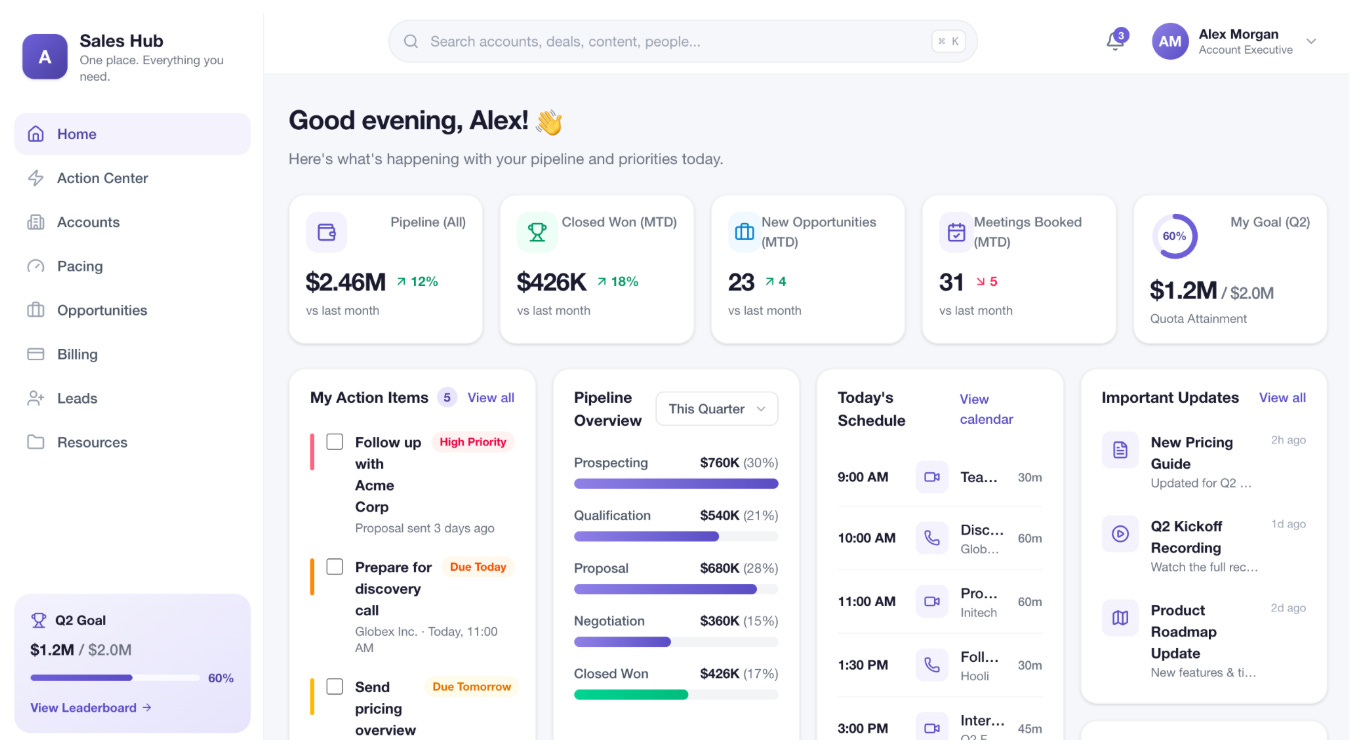
The mockup was the easy part. Actually hooking everything up has taken more time. But now that it is starting to work, it is pure joy, at least to me.
I don’t know if I should admit this, but I once pulled an all-nighter building a Tableau dashboard for my Sales team. I love this stuff. And compared with the old way of doing it, this feels like a dream. The level of customization and ease isn’t even comparable.
My primary goal with the Sales Hub is to avoid a world where everyone builds their own bespoke AI dashboard and burns a bunch of Claude usage recreating roughly the same thing. Instead, I want to package the information people need in a way that is useful, intuitive, and not overwhelming.
But I also have an ulterior motive: I want clean data. The holy grail of any Revenue Operations person.
Historically, the options for getting that information have not been great. Sometimes I can build a validation rule. Sometimes, because of Salesforce’s limitations, I can’t. And when I can’t, the fallback is usually some version of me finding the problem, messaging someone, and asking them to go into Salesforce to fix it. Which, of course, means more clicking.
So I built alerts directly into the Sales Hub. Each page in the left-hand menu surfaces the problems relevant to that section. On the Opportunities tab, for example, it calls out Opportunities that are missing Products. On the Billing tab, it flags Closed Won Opportunities that were sold at a CPM but are missing the CPM Rate.
Then there is an Action Center that pulls all of those alerts into one place. And this is the part I’m especially excited about: the items can be fixed inline. Instead of me tracking someone down and saying, “Hey, can you go find this Opportunity, open it, navigate to the right place, and update this field?”, the Sales Hub can simply say: “Here are the five things that need your attention. Fix them here.”
That feels like a small change, but I think it represents something much bigger.
For years, I’ve thought about how to make the CRM experience better: better configuration, better dashboards, better processes, better data hygiene. Now I’m wondering whether the more interesting opportunity is to leave Salesforce doing the things it is actually very good at and build a much better experience on top of it.
Salesforce can still hold the data. It can still manage permissions, connect to other systems, and enforce the business logic. But maybe the average seller doesn’t need to spend nearly as much time inside the Salesforce interface itself.
That distinction feels increasingly important as AI tools get better at both reading from and writing back to our systems. The question becomes less, “How do I make this system easier to navigate?” and more, “What is the simplest possible experience I can build for the person trying to get something done?”
After years of fighting with Salesforce’s limitations and chasing the dream of clean data, I can finally see a light at the end of the tunnel.